
 |
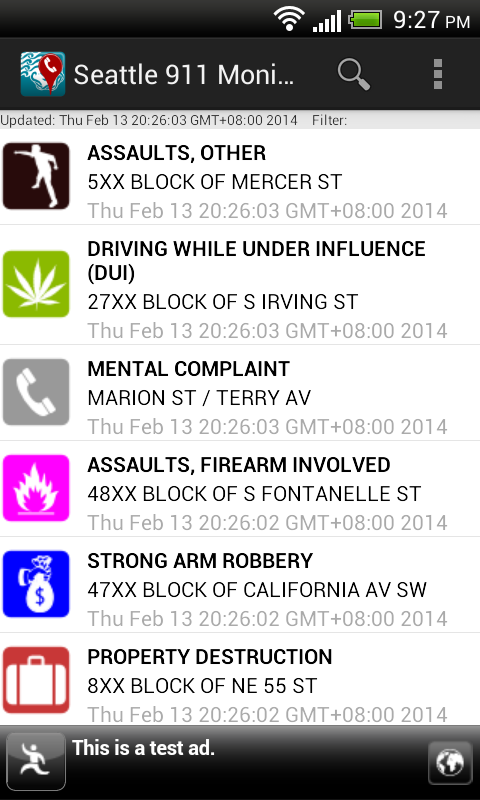
| A smart banner ad is displayed at the bottom of the app |
However, the old AdMob 6+ SDK will be replaced with the new ads SDK in the Google Play Services. Java code is required to use the Smart Banner AdView. I wanted the AdView in the new Google Play Services SDK to behave as in the legacy AdMob SDK i.e. hide itself when there is no data connection, and show itself when there is. The following example code snippets show how to do it.
Declare the Smart Banner AdView in the activity layout XML file
<LinearLayout xmlns:android="http://schemas.android.com/apk/res/android"
xmlns:tools="http://schemas.android.com/tools"
android:id="@+id/LinearLayout1"
android:layout_width="match_parent"
android:layout_height="match_parent"
android:orientation="vertical"
tools:context=".MainActivity" >
<!--
Add your layout views here. The total layout weight should be 1...
<FrameLayout
android:id="@+id/map_detail_container"
android:layout_width="match_parent"
android:weightSum="1"
android:layout_height="0dip"
/>
-->
<fragment
android:id="@+id/eventListFragment"
android:name="com.dom925.EventListFragment"
android:layout_width="fill_parent"
android:layout_height="0dp"
android:layout_weight="1.0" />
<com.google.android.gms.ads.AdView
xmlns:ads="http://schemas.android.com/apk/res-auto"
android:id="@+id/mainAdView"
android:layout_gravity="center_horizontal"
android:layout_width="match_parent"
android:layout_height="wrap_content"
ads:adSize="SMART_BANNER"
ads:adUnitId="a152fa33f70c96X"
/>
Code an Ad Listener class to hide and show the AdView
This listener will hide the AdView when it is constructed. When an ad has been loaded, it will display the AdView.
package com.dom925.cadmon.seattle;
import android.content.Context;
import android.view.View;
import android.widget.Toast;
import com.google.android.gms.ads.AdListener;
import com.google.android.gms.ads.AdRequest;
import com.google.android.gms.ads.AdView;
public class GoogleAdListener extends AdListener {
private Context _context;
private AdView _adView;
public GoogleAdListener(Context context, AdView adView) {
this._context = context;
_adView = adView;
//Hide the AdView on creation
_adView.setVisibility(View.GONE);
}
@Override
public void onAdLoaded() {
//Display the AdView if an Ad is loaded
_adView.setVisibility(View.VISIBLE);
}
}
Code the Activity to use the AdView
public class MainActivity extends FragmentActivity
{
//Declare a variable for my AdView
private AdView _adView = null;
@Override
protected void onCreate(Bundle savedInstanceState) {
super.onCreate(savedInstanceState);
setContentView(R.layout.activity_main);
//Initialize my AdView and assign the Ad listener to the view
_adView = (AdView)findViewById(R.id.mainAdView);
_adView.setAdListener(new GoogleAdListener(this, _adView));
//Make a request for an ad
requestGoogleAd(_adView);
}
@Override
protected void onResume() {
super.onResume();
//Show the AdView if the data connection is available
if (checkDataConnection()==true){
_adView.setVisibility(View.VISIBLE);
}
_adView.resume();
}
@Override
protected void onPause() {
_adView.pause();
super.onPause();
}
@Override
protected void onDestroy() {
_adView.destroy();
super.onDestroy();
}
private void requestGoogleAd(AdView adView){
AdRequest adRequest = new AdRequest.Builder()
.addTestDevice(AdRequest.DEVICE_ID_EMULATOR)
.addTestDevice("541603DA032A1B8626E5C8EA6FA2AADX")
.build();
adView.loadAd(adRequest);
}
private boolean checkDataConnection(){
boolean status = false;
ConnectivityManager connectivityMgr = (ConnectivityManager)getSystemService(Context.CONNECTIVITY_SERVICE);
if (connectivityMgr.getActiveNetworkInfo()!=null &&
connectivityMgr.getActiveNetworkInfo().isAvailable() &&
connectivityMgr.getActiveNetworkInfo().isConnected()) {
status = true;
}
return status;
}
}
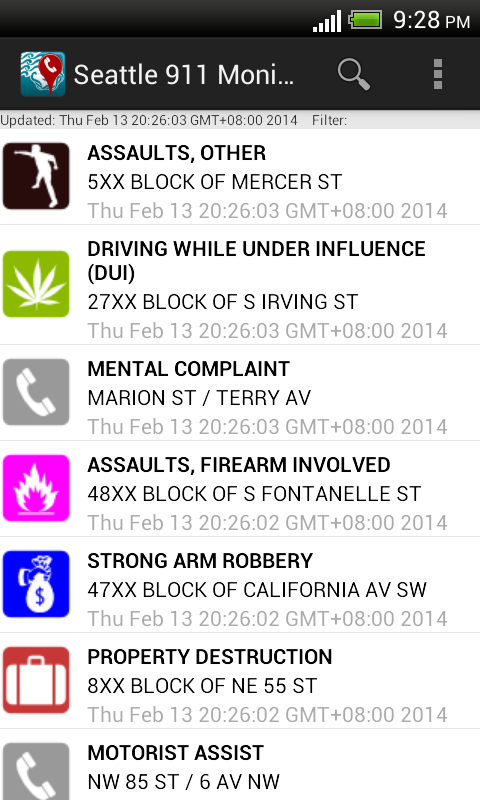 |
| The AdView is not displayed when the app is started without a data connection. |
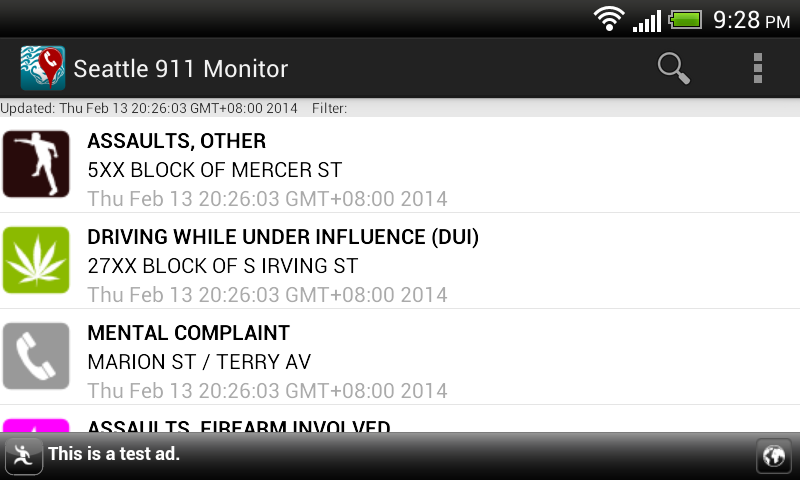 |
| When the data connection is enabled, the AdView is shown when the app is resumed |


